Celebrate the 4th of July in Style with Trimlight’s Color-Changing Lighting
The 4th of July is a time for celebration, family, and dazzling displays of patriotism. Trimlight brings a new level of excitement to this holiday...
3 min read
The Trimlight fireworks program pattern is one of the easiest ways to give your Trimlight 4th of July display real movement instead of just a static color change. This guide covers applying the firework motion in the Trimlight Edge app, building a red, white, and blue color base to pair with it, and scheduling the whole thing to run on July 4th only.
Tap the palette icon at the bottom left of the app, then choose or create the pattern the motion will apply to. A red, white, and blue combination reads closest to an actual fireworks show. With a pattern selected, open the motions tab beneath it and scroll to "firework." Tapping it previews the burst-style movement live. The same tab is where you would switch to a different motion later or set the pattern back to static.
Watch the effect in action here.
For the closest match to a real fireworks display, layer three colors into your pattern before applying the motion: red at RGB 255,0,0, white at RGB 255,255,255, and blue at RGB 0,0,255. Keep each segment short, around half a second to one second, so the transitions read as bursts once the firework motion is layered on top.
Save the pattern using "save as" to create a new one, or "cover" to overwrite an existing pattern. Skipping this step is the most common reason the motion does not carry over the next time the app opens.
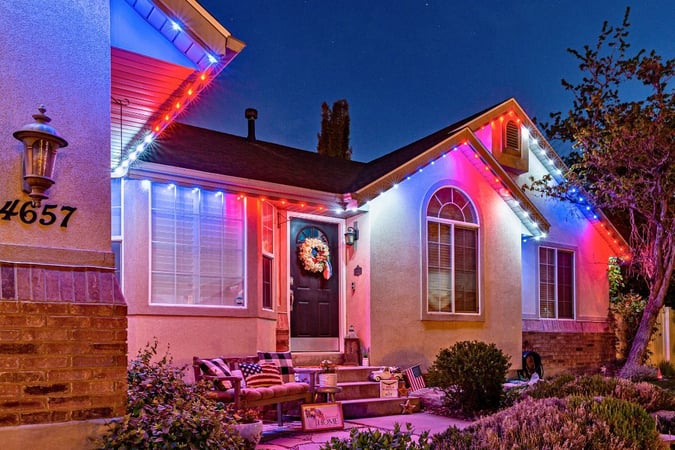
Chase and twinkle sit in the same motions section as firework. Chase pulls color along the roofline in sequence, closer to a rocket trail than a burst. Twinkle adds random flicker across the pattern, which pairs well with a red, white, and blue base for more sparkle and less directional motion. All three can be previewed live before saving. Increasing the speed of each effect simulates sparkles or sparks perfect for 4th of July.
Once the pattern is saved, open the Scheduler tab and create a new schedule. Select the fireworks pattern and set both the start date and end date to July 4th. Choose a start time around dusk and an end time late enough to cover the evening's celebrations. Because the schedule is date-specific rather than recurring, your Trimlight 4th of July setup switches back to its normal pattern automatically the next day, with no manual reset needed. This works the same way on any Trimlight installation nationwide, regardless of market or roofline size.
Related: Full Firework Motion Setup Guide
Tap the palette icon in the bottom left of Trimlight Edge, select your pattern, open the motions tab underneath it, and choose "firework." Save with "save as" or "cover" so the motion is retained. You must also "switch to timer mode and exit" This will set your effect to the firework pattern fully.
A red, white, and blue base pairs best with the firework motion: RGB 255,0,0 for red, RGB 255,255,255 for white, and RGB 0,0,255 for blue, each held for about half a second to one second.
Yes. The firework motion creates a bursting, layered look rather than a static color change, and it reads even closer to a real display when paired with a red, white, and blue base instead of a single color.
Yes, a preset 4th of July pattern is built into the app for anyone who wants a ready-made option without setting up colors or motion manually.
The 4th of July is a time for celebration, family, and dazzling displays of patriotism. Trimlight brings a new level of excitement to this holiday...
.jpg)
Stringing up lights every year is frustrating, and temporary solutions often fall short of expectations. Trimlight’s permanent RGB LED Christmas...
Most lighting systems come with trade-offs. They look good for a while, then burn out, break, or get replaced by something newer. Homeowners spend...