If you notice there is a SINGLE different color light than what you chose in the pattern and all other lights of that same color is working properly, that means there is a bad light. This is usually the easiest issue to spot, since everything else in your pattern will look correct except for that one light.
A technician from your local dealer should be contacted to schedule a time for them to replace the faulty light.
Because Trimlight bulbs are backed by a lifetime parts warranty, getting a single faulty light replaced is typically a quick and hassle-free process for your dealer to handle.
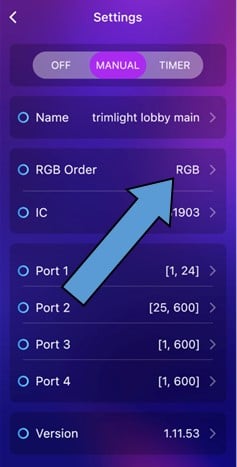
If one specific color or a combination of colors of all the lights in your pattern are not producing the correct colors, the issue is more likely tied to your system's color configuration rather than one bad bulb. Please check to see if the RGB ORDER is correct on your app. For most applications, it should be set to RGB.
If that fails to fix the issue, call your local dealer and schedule a repair.
Keep in mind that RGB order and pixel assignment are configured by your installer during setup. These settings affect how your entire system displays color, so if adjusting them in the app doesn't resolve the issue, it's best to let your dealer's factory-trained technicians handle any further changes rather than continuing to adjust settings on your own.