
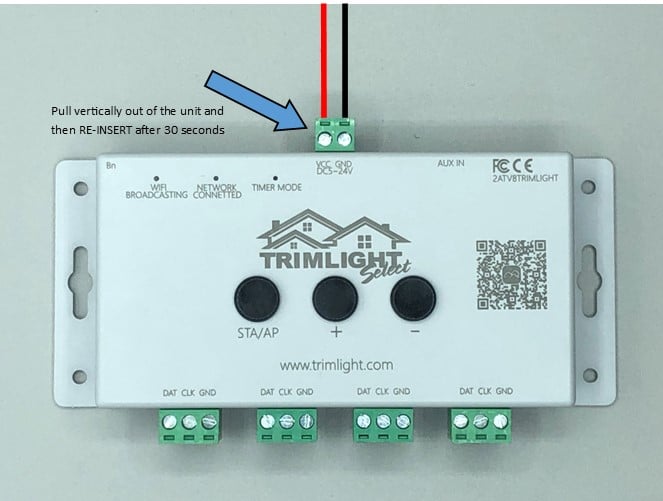
Locate the small green power block at the top of the Trimlight Select Plus controller. This connector is attached to the red and black power wires. Carefully pull the green block vertically out of the controller to disconnect the unit from power. Hold the green connector itself rather than pulling directly on the wires, since pulling on the wires could loosen or damage the connection.
Leave the controller unplugged for at least 30 seconds and up to one full minute. This gives the unit enough time to power down completely before it is restarted. Do not reinsert the connector immediately, even if the indicator lights turn off right away.
After the waiting period, carefully place the green power block back into the same connection point at the top of the controller. Make sure it is aligned correctly and seated securely. Allow the controller a few moments to power back on and begin reconnecting to the network.
Once the controller has restarted, force close the Trimlight Select Plus app on your mobile device. Simply leaving the app open in the background may not fully refresh the connection. Close the app completely, wait a few seconds, and then reopen it.
After reopening the app, check whether the controller appears and responds normally. Test the system by turning the lights on, selecting a saved pattern, or changing the displayed colors.
If the controller still does not reconnect, confirm that your Wi-Fi network name or password has not recently changed. You should also check that the network signal is strong at the controller’s location. Exterior walls, brick, metal, distance from the router, and other obstructions may weaken the connection.
You can repeat the soft-reset process once more if necessary, making sure the controller remains disconnected for the full 30 seconds to one minute. If the issue continues after restarting both the controller and app, use the Trimlight troubleshooting guide or contact your local Trimlight dealer for additional assistance.